Appearance
Choosing an AI Model
Quick Answer
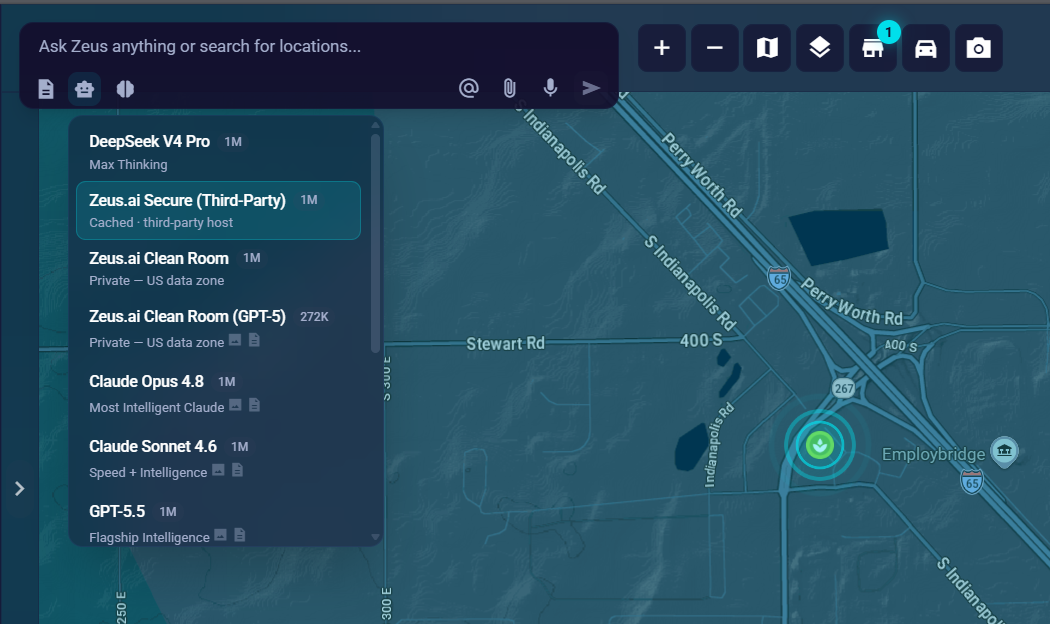
Use the model selector dropdown in the chat composer to choose which AI model powers your conversation. Zeus.ai Secure (Third-Party) is the default model — a cached, SiteZeus-paid DeepSeek model hosted by Fireworks AI under no-retention terms. The catalog covers twelve models across four providers: DeepSeek, OpenAI (GPT), Claude (Anthropic), and Gemini (Google). Accounts with the Clean Room subscription also have access to two data-resident Zeus.ai Clean Room models that run entirely inside the Zeus.ai Azure tenant (US data zone).
Model availability is governed company-wide. By default every company has access to the two Clean Room models and Zeus.ai Secure (Third-Party). Additional public models are opt-in and must be enabled by a company admin or SiteZeus support.
Model Availability and Locks
Some models may appear with a lock icon in the selector. There are two reasons a model can be locked:
- Clean Room subscription required — the two Zeus.ai Clean Room models are gated behind the Clean Room add-on. Clicking a locked Clean Room model opens an upgrade prompt. The Clean Room is free while in beta; contact support@sitezeus.com to enable access.
- Policy: ask your administrator — the model is not on your company's allowed list. A company admin or SiteZeus support can enable it from Company Settings (profile menu) or the support-admin panel.
Available Models
Zeus.ai Secure (Third-Party) — Default
- Description: Cached — third-party host
- Context: 1M tokens (1,000,000)
- File support: Text and code only — no images, PDFs, audio, video, or URLs
- Default: Yes — this is the model selected when you open a new thread
- Data handling: Hosted by Fireworks AI via Azure Foundry, outside the Zeus.ai Azure tenant. Fireworks applies zero data retention by default and does not train on customer data. SOC 2 Type II and HIPAA certified.
- Use when: You want a fast, capable default model for everyday Zeus.ai tasks
Zeus.ai Clean Room (subscription required)
Zeus.ai Clean Room models run entirely inside the Zeus.ai Azure tenant (US data zone). Your prompts are processed without leaving the Azure environment and are never sent to the model vendor's public cloud.
Access: Requires the Clean Room add-on. The Clean Room is free while in beta. When your account is not entitled, a lock icon appears next to each Clean Room model; clicking it opens an upgrade prompt. Contact support@sitezeus.com to enable access. Company admins can also toggle the Clean Room on or off from Company Settings.
Zeus.ai Clean Room
- Description: Private — US data zone
- Context: 1M tokens (1,000,000)
- File support: Text and code only — no images, PDFs, audio, video, or URLs
- Data handling: DeepSeek V4 Pro on Azure AI Foundry (first-party US data zone). No prompt caching. No training or retention.
- Use when: You need data-resident chat for text-based analytics tasks
Zeus.ai Clean Room (GPT-5)
- Description: Private — US data zone
- Context: 272K tokens
- File support: Images, PDFs, URLs, and text
- Data handling: Azure OpenAI GPT-5 hosted in the US Data Zone (DataZoneStandard). Data resident in the US; no external egress.
- Use when: You need document or image analysis in a data-resident environment
DeepSeek V4 Pro
- Description: Max Thinking
- Context: 1M tokens (1,000,000)
- File support: Text and code only — no images, PDFs, audio, video, or URLs
- Availability: Requires admin opt-in (policy-gated) or a company DeepSeek API key
- Best for: Deep reasoning tasks when you want the direct DeepSeek API
- Use when: Your admin has enabled it and you want max-thinking reasoning on text
Claude Models (Anthropic)
All Claude models require admin opt-in unless your company has added an Anthropic API key or a SiteZeus admin has enabled them.
Claude Opus 4.8
- Description: Most Intelligent Claude
- Context: 1M tokens (1,000,000)
- File support: Images, PDFs, URLs, and text
- Best for: Complex multi-step analysis requiring deep Claude reasoning
- Use when: You need the highest-capability Claude model
Claude Sonnet 4.6
- Description: Speed + Intelligence
- Context: 1M tokens (1,000,000)
- File support: Images, PDFs, URLs, and text
- Best for: General-purpose chat, analytics workflows, tool-backed tasks
- Use when: You need a balanced Claude model for image or document analysis
Claude Haiku 4.5
- Description: Fast & Lightweight
- Context: 200K tokens
- File support: Images, PDFs, URLs, and text
- Best for: Quick lookups and short questions
- Use when: Speed matters more than depth
OpenAI GPT Models
All OpenAI models require admin opt-in unless your company has added an OpenAI API key or a SiteZeus admin has enabled them.
GPT-5.5
- Description: Flagship Intelligence
- Context: 1M tokens (1,000,000)
- File support: Images, PDFs, URLs, and text
- Best for: Demanding analytics workflows where maximum OpenAI capability is needed
- Use when: You want OpenAI's most capable model
GPT-5.4
- Description: Flagship Intelligence
- Context: 1M tokens (1,000,000)
- File support: Images, PDFs, URLs, and text
- Best for: Strong general-purpose analytics
- Use when: You want a capable OpenAI model at lower cost than GPT-5.5
GPT-5.4 Mini
- Description: Fast + Affordable
- Context: 1M tokens (1,000,000)
- File support: Images, PDFs, URLs, and text
- Best for: Quicker tasks where response speed and cost matter
- Use when: You need OpenAI's fast, lightweight option at 1M context
Gemini Models (Google)
Gemini models are fully multimodal — they also support audio and video files. All Gemini models require admin opt-in unless your company has added a Google API key or a SiteZeus admin has enabled them.
Gemini 3.1 Pro (Preview)
- Description: Advanced Reasoning (Preview)
- Context: 1M tokens (1,000,000)
- File support: Images, audio, video, PDFs, URLs, and text
- Best for: Large document analysis, deep multimodal reasoning
- Use when: You need extensive context plus the newest Gemini reasoning
Gemini 3.5 Flash
- Description: Agentic + Coding (GA)
- Context: 1M tokens (1,000,000)
- File support: Images, audio, video, PDFs, URLs, and text
- Best for: Quick multimodal tasks, agentic workflows, and coding at large context
- Use when: You want a stable, fast Gemini model at 1M context
Reasoning Effort
The Reasoning Effort control lets you tune how much the model "thinks" before responding, independently of which model you have chosen.
Where to Find It
The Effort lever sits next to the model selector in the chat composer. Click it to open a popover with a 5-notch slider ranging from Off on the left (Faster) to Max on the right (Smarter).
Effort Levels
| Level | Description |
|---|---|
| Off | Fastest -- minimal reasoning |
| Low | Quick answers, light reasoning |
| Medium | Balanced speed and depth (default) |
| High | Deeper reasoning, slower |
| Max | Most thorough -- highest latency |
Your selection is saved automatically and applies to every new message until you change it. Click any notch label or drag the slider thumb to switch levels. The tooltip on the control reads: "Higher effort makes the model think longer -- smarter, more thorough answers, but slower. Lower effort responds faster."
When to Adjust Effort
- Off or Low -- Quick factual lookups, short location searches, or simple follow-up questions where speed matters more than depth.
- Medium (default) -- Everyday Zeus.ai tasks: analytics, scorecards, reports, Site Sonar.
- High or Max -- Complex multi-step analysis, ambiguous or nuanced site comparisons, or when the model's first answer was less thorough than you expected.
How to Change Models
Step 1: Find the Model Selector
- Click in the chat input to expand the composer
- Look for the model dropdown at the top-left of the composer
- It shows the current model name (default: Zeus.ai Secure (Third-Party))
Step 2: Select a Model
- Click the dropdown to see all available models
- Each model shows its description and context limit
- Capability icons indicate support for images, PDFs, audio, video, and URLs
- A lock icon means the model is unavailable — hover for the reason
- Click your preferred model to select it
Step 3: Continue Chatting
- Your next message will use the new model
- Previous messages in the thread stay as they were
- Model selection persists per conversation thread
Which Model Should I Use?
| Task | Recommended Model |
|---|---|
| General use (default) | Zeus.ai Secure (Third-Party) |
| Complex analytics/reasoning | DeepSeek V4 Pro, Claude Opus 4.8, or GPT-5.5 |
| Quick simple questions | Claude Haiku 4.5 or GPT-5.4 Mini |
| Searching locations | Zeus.ai Secure, GPT-5.4, or Claude Sonnet 4.6 |
| Analyzing images | Any Claude, GPT, or Gemini model |
| Large document analysis (PDF) | Claude Sonnet 4.6, GPT-5.5, or any Gemini model |
| Video / audio analysis | Gemini 3.1 Pro or Gemini 3.5 Flash |
| Maximum context needed | Zeus.ai Secure, Claude Sonnet 4.6, GPT-5.4, or any Gemini |
| URL / web link analysis | GPT-5.4, any Claude, or any Gemini |
| Data residency (text-only) | Zeus.ai Clean Room |
| Data residency + images/PDFs | Zeus.ai Clean Room (GPT-5) |
Understanding Model Behavior
Thinking / Reasoning Indicator
DeepSeek V4 Pro and Claude models support visible "thinking":
- You may see the model's reasoning process expand before the answer
- The composer border pulses with electric blue while processing
- The send button changes to a stop button during processing
- You can click stop or press Escape to cancel
Context Windows Explained
The context window determines how much information the model can consider:
- 200K tokens (~150K words): Claude Haiku 4.5
- 272K tokens (~200K words): Zeus.ai Clean Room (GPT-5)
- 1M tokens (~750K words): Zeus.ai Secure (Third-Party), Zeus.ai Clean Room, DeepSeek V4 Pro, Claude Sonnet 4.6, Claude Opus 4.8, GPT-5.5, GPT-5.4, GPT-5.4 Mini, Gemini 3.1 Pro, Gemini 3.5 Flash
Larger context = more conversation history and bigger documents in a single thread.
Model Capabilities Comparison
| Feature | Zeus.ai Secure | DeepSeek V4 Pro | GPT-5.5 / 5.4 | GPT-5.4 Mini | Claude | Gemini |
|---|---|---|---|---|---|---|
| Location search | Strong | Strong | Strong | Strong | Strong | Strong |
| Complex reasoning | Strong | Strong | Strong | Good | Strong | Good |
| Image analysis | No | No | Yes | Yes | Yes | Yes |
| PDF / Documents | No | No | Yes | Yes | Yes | Yes |
| Audio / Video | No | No | No | No | No | Yes |
| URL analysis | No | No | Yes | Yes | Yes | Yes |
| Context size | 1M | 1M | 1M | 1M | 200K–1M | 1M |
Zeus.ai Clean Room capabilities (subscription required — both models run in the US Azure tenant):
| Feature | Clean Room | Clean Room (GPT-5) |
|---|---|---|
| Image analysis | No | Yes |
| PDF / Documents | No | Yes |
| URL analysis | No | Yes |
| Audio / Video | No | No |
| Context size | 1M | 272K |
Tips
Default Company Access
By default every company has access to three models: the two Zeus.ai Clean Room models (subscription required to unlock) and Zeus.ai Secure (Third-Party). Other public models must be enabled by a company admin from Company Settings or by SiteZeus support.
Match Model to Your Content
- Text and code: Zeus.ai Secure (default) works well
- Images or PDFs: switch to any Claude, GPT, or Gemini model
- Audio or video: use a Gemini model
- Documents over 100 pages: use Claude Sonnet 4.6, GPT-5.5, or any Gemini
- Data residency required: use a Zeus.ai Clean Room model
Consider the Trade-offs
- Reasoning models (DeepSeek V4 Pro, Claude Opus 4.8) "think" before responding, so they take longer
- Gemini 3.1 Pro sits on the preview channel; Gemini 3.5 Flash is the stable GA option
- Larger context windows do not always mean better answers — pick the model that fits the task
- Clean Room (GPT-5) has a hard 272K context ceiling; use the plain Clean Room for longer threads